
Connect · Settings · Session · Route · Identity
Five backend services, one single door to the outside.
The services communicate over mutually authenticated TLS. Exactly one of them is reachable from outside. That is not a configuration you can forget — it is the topology.
01Reception, workspace, memory
The three services that really matter can be explained without a single technical term.
- Connect
- Reception. Messages arrive here — from the mobile app, desktop app, Telegram, or inbox.
- Route
- The workspace. This is where the assistant thinks, uses tools, and completes tasks.
- Session
- The memory. This is where chat history, responses, work logs, usage data, usage limits, and important events live.
- Settings
- Configuration. This is where agent settings and instructions, model and provider integrations, skills, jobs, and email configurations live.
- Identity
- User management. This handles the permissions of all agents and users, device linking, authorization, and password resets.
02The full picture
A request always takes the same path. Only Connect has one foot outside.
Fig. 01The path a request takes through the system.
Diagram as text
- The mobile app connects iOS and Android users to the backend.
- The desktop app connects macOS, Windows, and Linux users to the backend and gives administrators access to configuration and operations.
- Telegram and email deliver messages to the backend.
- Inside the backend, Connect receives everything — it is the only service reachable from outside.
- Route queries the selected language model and runs tools.
- The model responds to Route.
- Session stores history, runs, steps, and costs.
- The result returns to the requesting app through Connect.
Route, Session, Settings, and Identity exist exclusively on the internal network. Two connections cross the boundary: Traefik into Connect, and Route out to the language model.
03What a run is
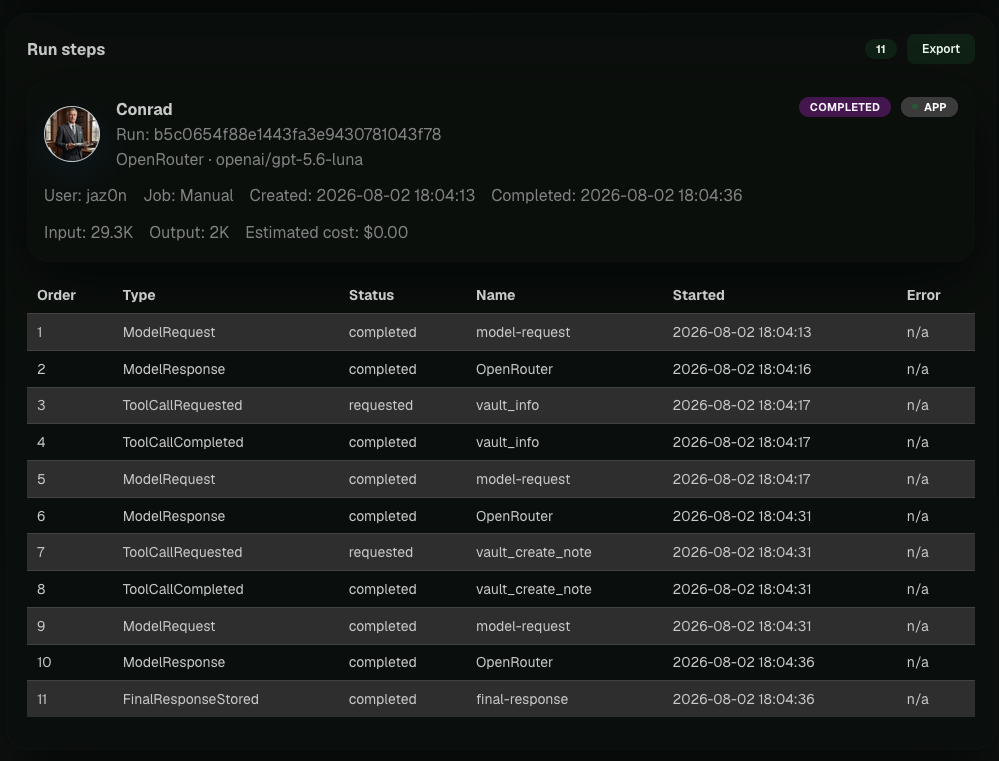
Not “the assistant replied,” but a sequence of individually logged steps.
- ModelRequest
- ModelResponse
- ToolCallRequested
- ToolCallCompleted
- FinalResponseStored
- OutboundDeliveryRequested
- OutboundDeliveryCompleted
Tool steps repeat while the agent works, up to the configured maximum number of tool loops. Every step has a timestamp; model steps also record the provider, model, and token counts.
04Skill, job, session
These three are most often confused, and the difference is very small.
- Skill
- Describes how a task should be solved.
- Job
- Determines when a task starts automatically.
- Session
- The current conversation context with a user in one channel.
From that follow all the practical details: build a skill once and use it as often as you like. Run the same skill manually or in a job. And start a session fresh with /new without losing the skill or job.
05What is in it — and what is not
- PostgreSQL
- One database per service, one server.
- Internal mTLS
- Mutually authenticated TLS between all services, with service tokens from Identity.
- Credentials
- Provider keys are stored encrypted and resolved only when a run starts. The worker does not hold them and the model never sees them.
- Limits
- Route checks a user's usage limit before work is accepted at all.
- No RAG
- No vector database, no embeddings. Files are searched literally (and can be extended if you need it).
- No telemetry
- The installation reports nothing externally.